Now Available on the App Store

Australia's Best
Caravan Companion

Plan trips, nail your pre-departure checks, track your van's maintenance, and explore every landscape Australia has to offer — all in one beautifully designed app.

Designed in Australia
One-time purchase — no subscriptions
Works offline in remote areas
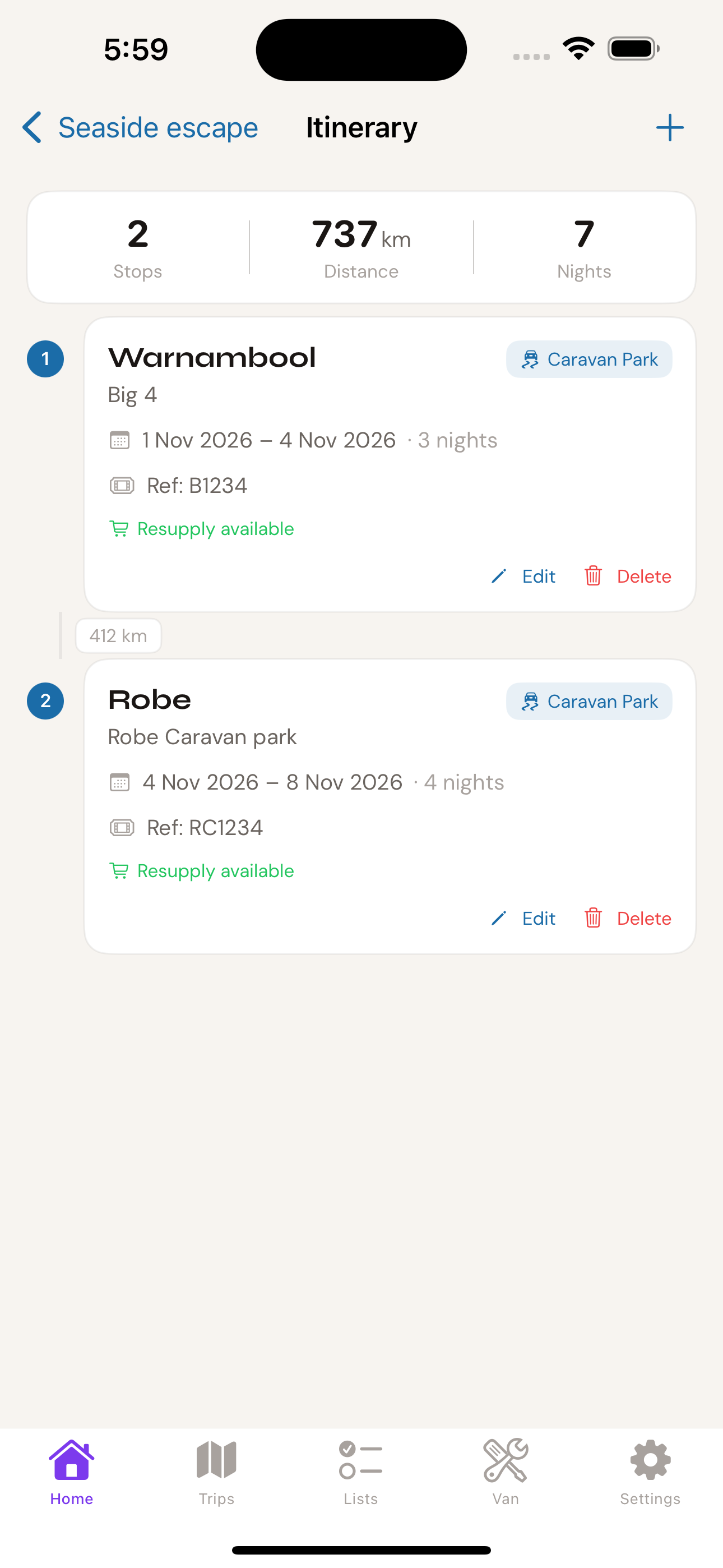
Trip detail screen showing Seaside escape coastal trip
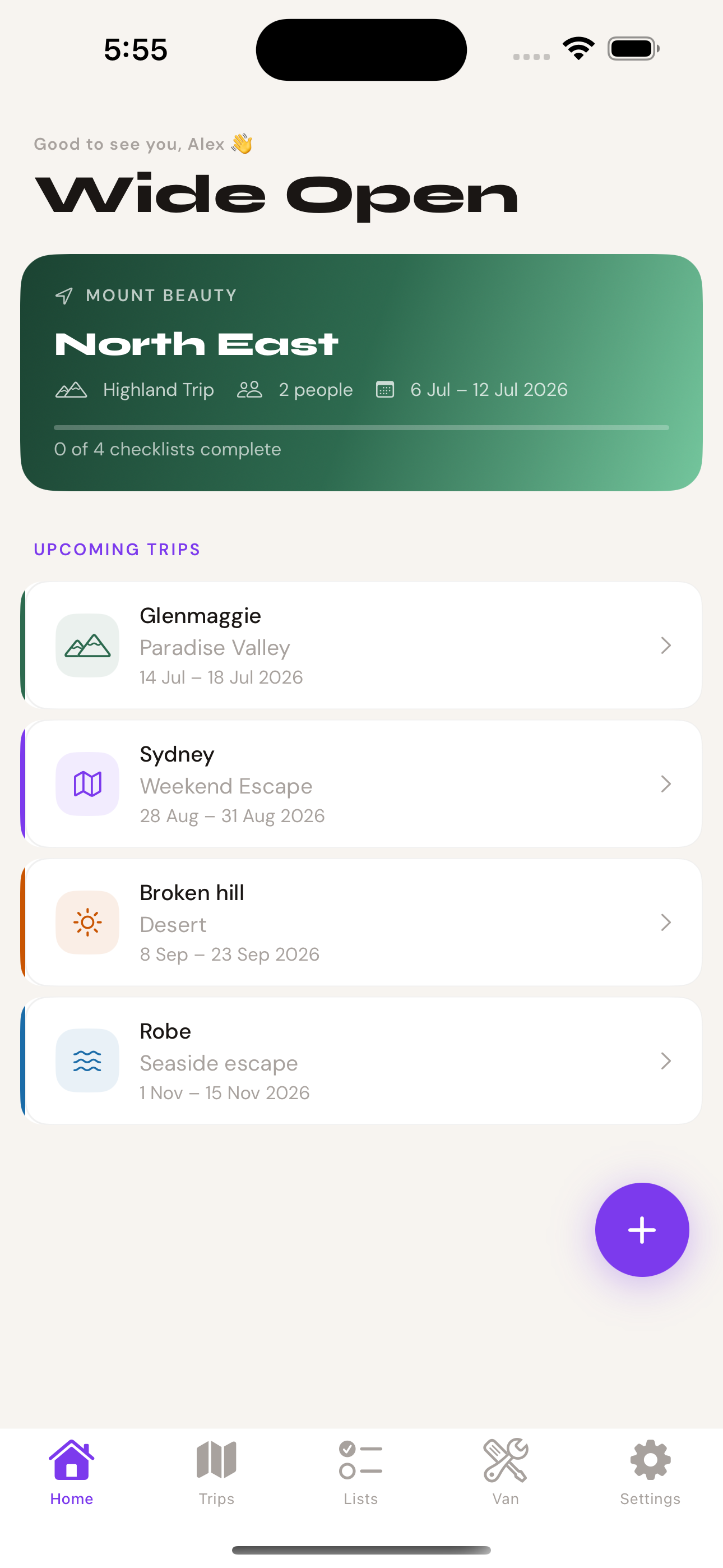
Wide Open Australia home screen showing upcoming trips
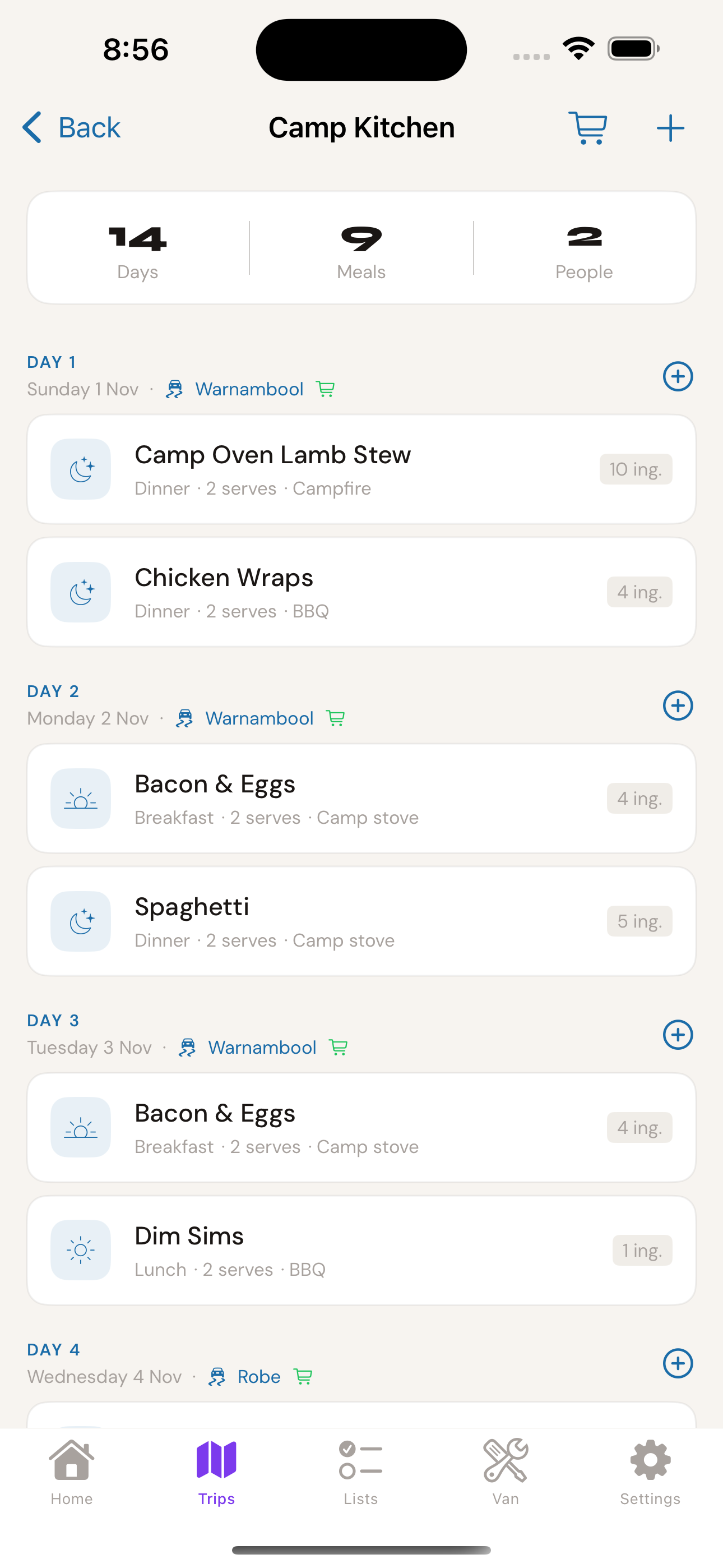
Camp Kitchen meal planner showing day-by-day meals

Themes for every corner of Australia

Outback / Desert
Simpson Desert · Broken Hill · Flinders Ranges
Coastal / Beach
Robe · Great Ocean Road · Ningaloo
High Country
Snowy Mountains · VIC Alpine · Daintree
Dusk Theme
The Australian sky at 6pm — pure magic
Everything you need

Built for the way
Australians actually travel

Not a generic camping app tweaked for Australia. Built from the ground up for Australian caravanners.

🗺️

Trip Planning

Create and manage multiple trips at once. Set destinations, travel dates, crew size, and pick your landscape theme. All your adventures in one place.

Pre-Departure Checklists

Never leave the driveway without the safety chains crossed again. 16-point checklists cover everything from hitch coupling to tyre pressures — and you can add your own custom items.

🔧

Van Maintenance Tracker

Track service status for every component — wheel bearings, gas regulators, breakaway batteries. Get early warnings before something becomes a problem in the middle of nowhere.

📋

Warranty Register

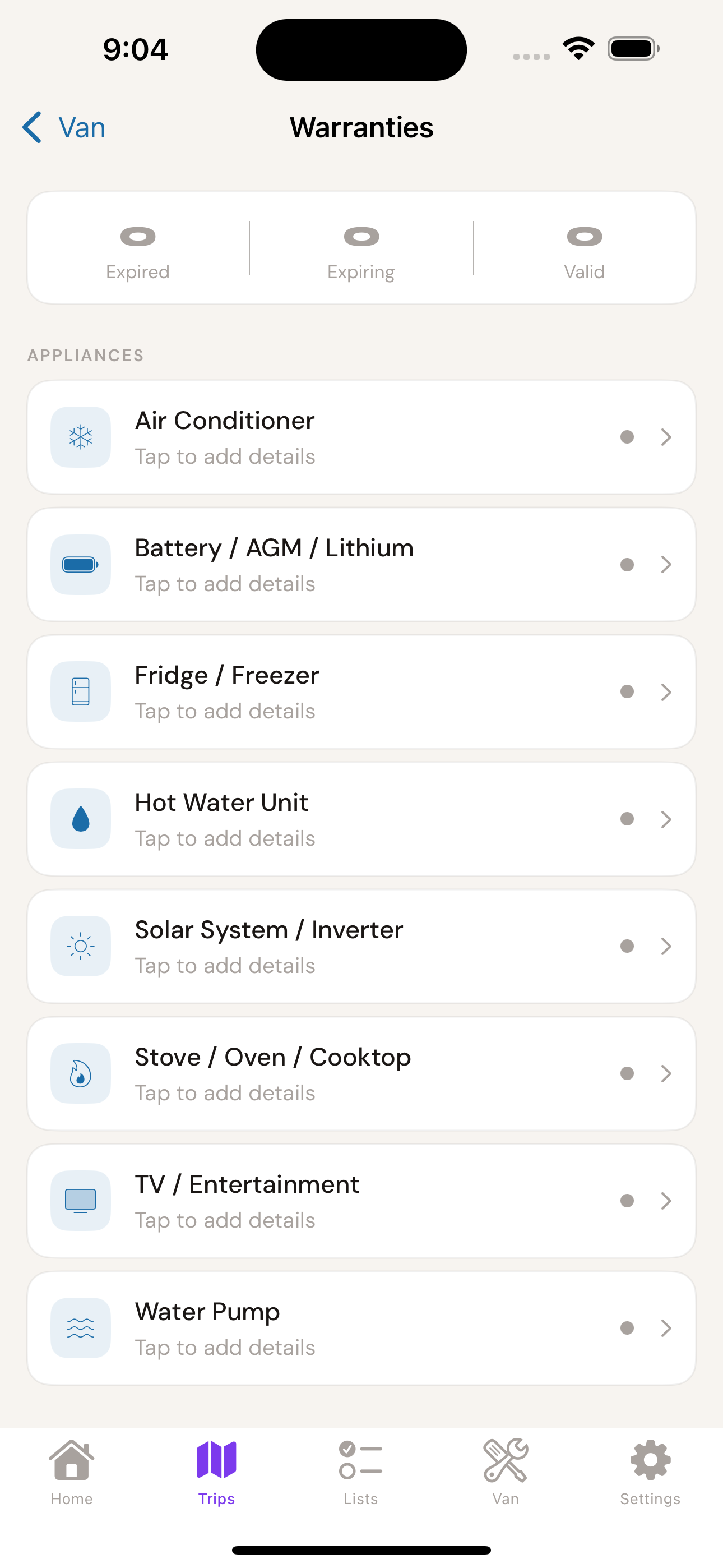
One place for all your appliance warranties. Know exactly when your Dometic fridge or Truma hot water expires — before it expires on the road.

📖

Trip Log

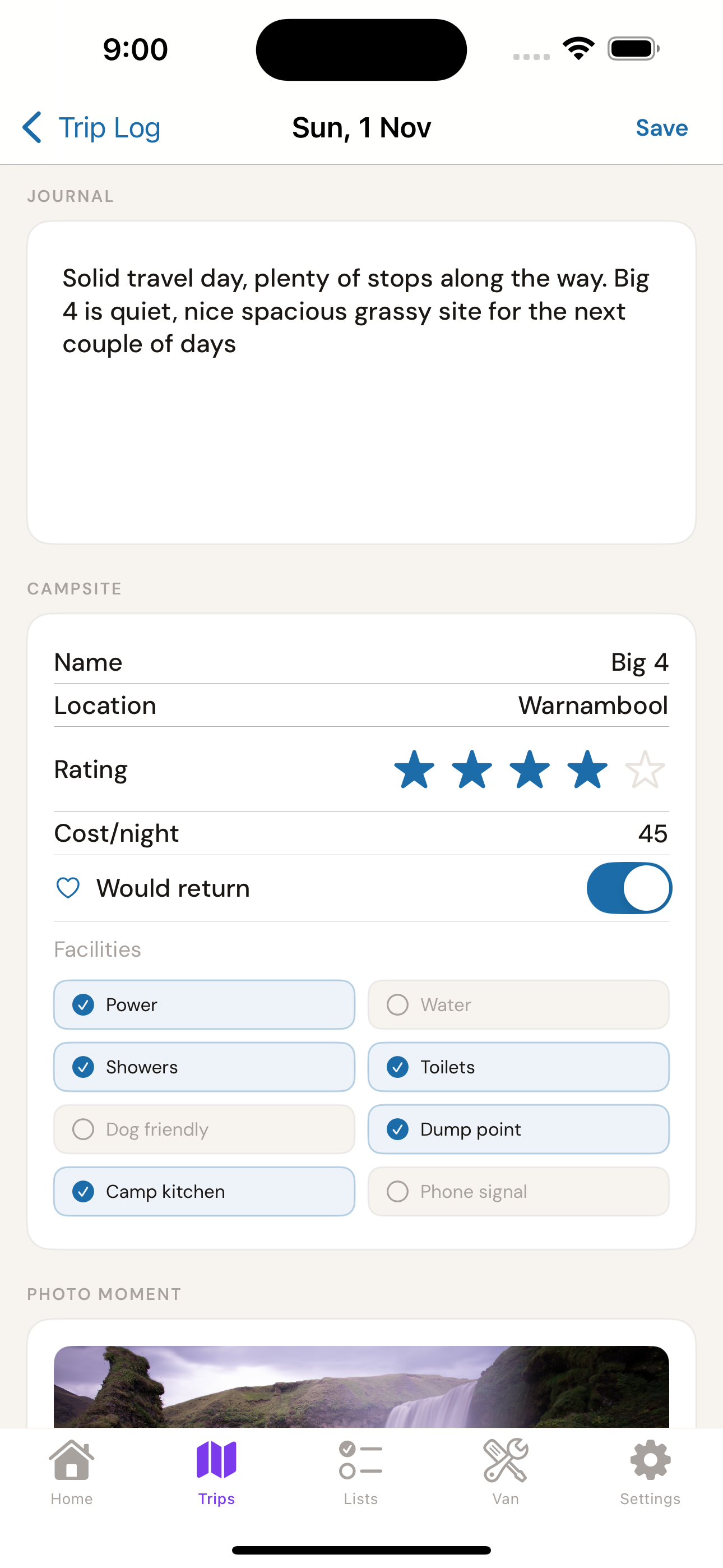
Daily journal, campsite ratings, facilities checklist, cost per night, and a photo moment — all attached to each day. Your personal record of every adventure, forever.

Campsite Ratings

Rate every campsite, log facilities, cost per night, and flip the "Would return" toggle. Build a personal campsite guide you actually trust — not one written by someone who visited in 2019.

🗓️

Trip Itinerary

Day-by-day planning for each trip. Map out your stops, add notes about distances and bookings, and keep everything in one place so the whole crew is on the same page.

🛒

Shopping List

Per-trip shopping lists with categories and tick-off interface. Camp Kitchen feeds ingredients directly to your list — so your food shopping is half done before you add a single item manually.

🍳

Camp Kitchen

Meal planning and recipes built around your trip dates and crew size. Build a library of camp favourites, plan meals by day, and let the app scale quantities automatically.

🛡️

Insurance & Emergency Info

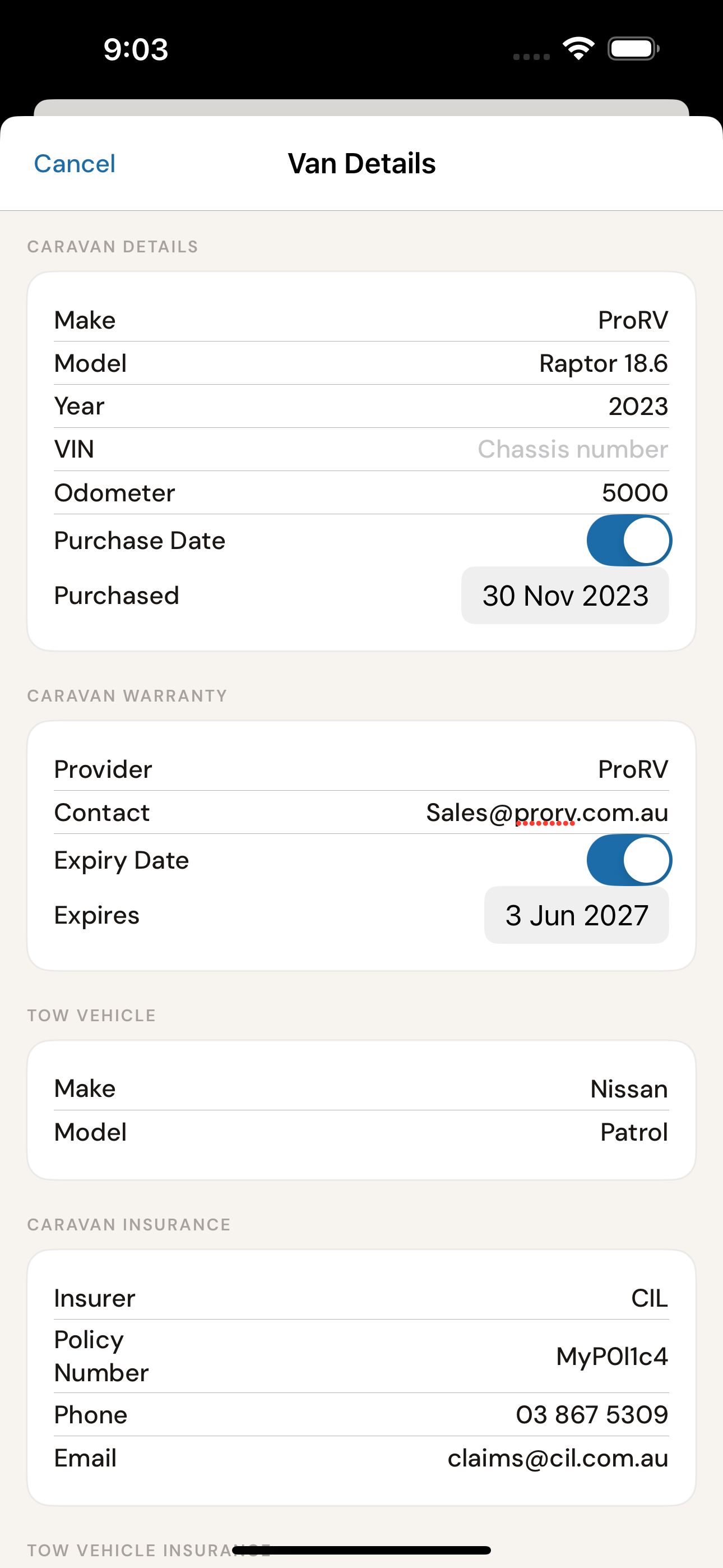
Store insurance policy details, roadside assist membership, and emergency contacts — all available offline. When something goes wrong 300km from anywhere, you'll want this to hand.

🎨

Landscape-Adaptive Design

Wide Open Australia is the only caravan app that visually adapts to where you're going. Head outback and the app shifts to burnt orange and gold. Coast-bound? Deep navy to aqua. High country? Forest green. It's a small thing that makes every trip feel like its own adventure.

📡

Works Offline

No signal? No worries. Everything you need works completely offline — perfect for remote outback tracks where connectivity is a distant memory.

Home screen showing upcoming trips
Trip Management

Your adventures, perfectly organised

Create a trip in under a minute. Wide Open Australia handles the structure — you handle the driving. Every trip gets its own landscape identity, progress tracking, and gear checklist.

  • Name your trip, choose your destination, set your dates
  • Landscape theme auto-sets the visual identity
  • Track crew size, prep progress, and module completion
  • Past trips saved forever so you can relive every adventure
Pre-departure checklist at 13 of 15 complete
Safety First

Leave nothing to memory

A thorough pre-departure checklist is the difference between a smooth trip and a stressful one. We've built one based on real caravan safety protocols — covering every critical check before you hit the highway.

  • 16 standard safety checks covering hitch, lights, tyres and more
  • Add your own custom items for your specific setup
  • Visual progress bar so you know exactly how close you are
  • Resets cleanly for each new departure
Service schedule showing overdue and upcoming items
Van Health

Stay ahead of breakdowns

Caravans have a lot of moving parts. Literally. The maintenance tracker keeps an eye on service intervals for everything from wheel bearings to gas regulators — so you know about problems before they become roadside disasters.

  • Track every service item with Overdue / Due Soon / Good status
  • Days-remaining warnings so you plan services before trips
  • Customise for your specific van make and model
  • Peace of mind at every campsite
★★★★★

"Finally an app that gets it. Not just a checklist — it's a proper system for how we actually manage our van life."

— Beta tester, Jayco Expanda owner, SA

★★★★★
"The maintenance tracker alone is worth the price. Caught a wheel bearing issue before our Flinders Ranges trip. That could have been very ugly."
Mike R. — Toyota LandCruiser + Jurgens
★★★★★
"We've done 14 trips now and every one is in the app. Love being able to flip back through them. The coastal theme for our Great Ocean Road run was perfect."
Sandra & Pete — Grey Nomads, QLD
★★★★★
"The pre-departure checklist has stopped at least three arguments about whether we checked the gas. Worth it for that alone."
Dave T. — Jayco Starcraft owner, VIC
One-time Purchase

Wide Open Australia

Your complete caravan companion

$7.99

Launch price AUD · One-time purchase · No subscription · No hidden fees

  • Unlimited trip creation & history
  • Pre-departure checklists
  • Trip itinerary planner
  • Shopping list with categories
  • Camp Kitchen & meal planner
  • Trip Log — journal & campsites
  • Van maintenance tracker
  • Warranty register
  • Insurance, roadside & emergency contacts
  • All 4 landscape themes
  • Works completely offline
  • Free updates included
🍎 Download on the App Store
User Guide

How to get the most
out of Wide Open Australia

Everything you need to know, from your very first trip to power-user tips.

1

Creating & Managing Trips

Set up your first trip in under a minute.

1

Tap "+ Create New Trip" on the Home screen

From the Home tab, tap the orange "Create New Trip" button. This opens the trip creation form. You can have as many trips active or saved as you like — there's no limit.

2

Give your trip a name and destination

Name it something meaningful — "Broken Hill May 26", "Robe Easter", whatever works for you. Add the destination location (e.g. "Broken Hill, NSW") and your crew size. This info appears on your trip card and in your history.

3

Set your dates

Set your departure date. Wide Open Australia uses this to sort your trip list chronologically and will eventually use it to surface helpful reminders before you leave.

💡 Tip: Enter dates even if they're approximate. It helps keep your trip history meaningful when you look back.
4

Choose your landscape theme

Select the landscape that best matches your destination — Outback, Coastal, High Country, or leave it on the default Dusk theme. This sets the gradient hero card colour for the entire trip. You can change it at any time.

5

Your trip is created — start working through the modules

Once created, you'll see the Trip Detail screen with your modules: Itinerary, Checklists, Camp Kitchen, Trip Log, and Maintenance. Your checklist progress percentage updates in real time on the hero card at the top. Aim for all checklists complete before you depart.

💡 Tip: The progress bar on your trip card updates in real time. It's very satisfying watching that hit 100%. Set it as your goal before every departure.
Home screen showing upcoming trips
2

Pre-Departure Checklists

Your safety net before every single trip.

1

Open Checklists from your Trip Detail screen

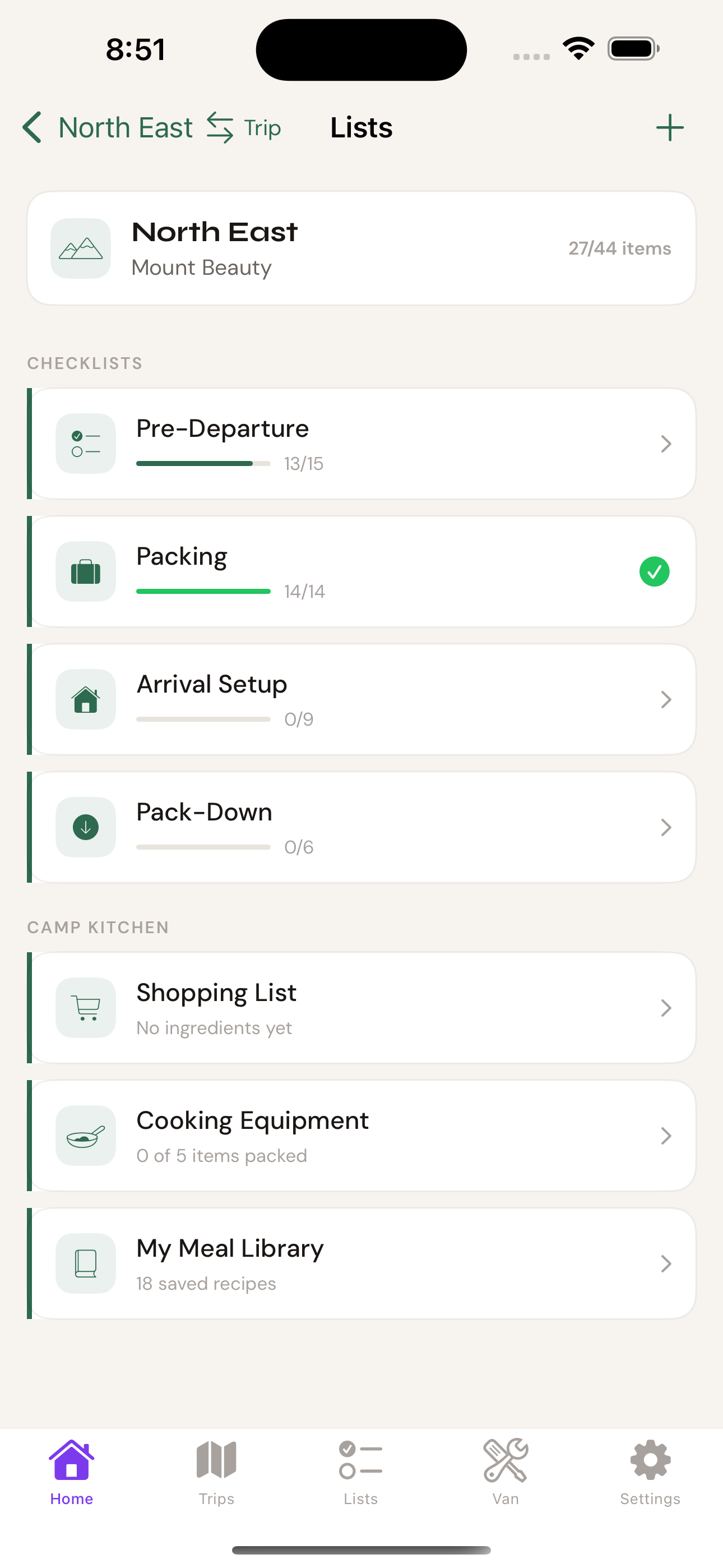
Tap the Checklists module from your trip. You'll see four checklists: Pre-Departure, Packing, Arrival Setup, and Pack-Down. Each has its own progress bar — your trip's overall checklist progress reflects all four combined. A green tick appears on a checklist card when it's 100% complete.

2

Work through each item — tap to check off

Each item has a minimum 52pt tap target (large and easy to hit, even with cold hands at 6am). Tap an item to mark it complete. It shows a checkmark and moves visually to indicate done. Tap again to uncheck if you made a mistake.

💡 Safety tip: Don't rush this. The checklist exists to catch the thing you always forget. Work through it methodically, ideally with your travel partner calling out each item.
3

Add your own custom items

Every rig is different. Tap "+ Add custom item" at the bottom of the checklist to add items specific to your van setup — "solar panel angle set", "fridge switched to 12V", whatever your process requires. Custom items are saved and reused for future trips.

4

Complete all 16 items before you leave

The Pre-Departure checklist shows as complete (green) on your Lists screen when all items are ticked. Make it a rule: don't pull out of the driveway until it's green.

💡 What's covered in Pre-Departure: Tow vehicle check, hitch coupling, safety chains crossed, breakaway cable, all lights, jockey wheel retracted, handbrake released, weight distribution checked, fridge to 12V, antenna and awning secured, windows and hatches locked, and more.
Lists screen showing all four checklists with progress bars
Pre-departure checklist at 13 of 15 complete
3

Trip Itinerary

Plan your days so you actually get to everything you want to see.

1

Open the Itinerary from your Trip Detail screen

Tap the Itinerary module from inside your trip. You'll see a day-by-day view based on your trip dates. Each day is a card you can fill in with planned stops, activities, and drive times.

2

Add your stops with dates and nights

Tap the + button to add a stop. Enter the location name, caravan park name, arrival and departure dates (nights auto-calculate), and your booking reference number. The app shows total stops, total distance, and total nights at a glance in the summary strip at the top.

💡 Tip: Add "Resupply available" to stops where you know there's a decent supermarket or IGA. Wide Open Australia flags these on the stop card — handy when you're planning a multi-week outback run and need to know where you can restock.
3

The distance between stops is calculated automatically

The itinerary shows the distance between consecutive stops (e.g. "412 km" between Warnambool and Robe). This helps you plan realistic driving days and spot legs that are too long for comfort — nobody wants a 600km tow day.

4

Store booking references on each stop

Add your caravan park booking reference directly to the stop card. No more hunting through emails at 5pm trying to find the confirmation number. It's right there, offline, on the stop you're arriving at.

💡 Remote travel tip: For outback runs where some legs are 300+ km between stops, note any fuel availability in the stop name. You want to know that before you leave, not when the tank hits a quarter full.
Itinerary showing Warnambool and Robe stops
4

Shopping List

Never arrive at camp missing something critical.

1

Open Shopping List from your Trip Detail screen

The Shopping List is per-trip — so each adventure has its own list. Open it from the Shopping List module in your trip. You'll see a clean list of items with categories and a tick-off interface for when you're actually in the shop.

2

Add items to your list

Tap the + button to add items. You can enter item name, category (Food, Toiletries, Camping Gear, etc.), and optional quantity. Items are grouped by category so you can work through the supermarket section by section — the way a sensible person shops.

3

Build your list in advance — add as you think of things

Start your shopping list the week before the trip, not the morning of. Add items as you think of them. Running low on gas mantles? Add it now. Need a new stubby holder? Extremely important — add it now.

💡 Tip: Build a base list of your standard trip essentials, then add trip-specific items on top. Over time your base list will be nearly complete and you'll rarely forget anything.
4

Tick items off as you shop

When you're at the shops, tap each item to mark it collected. Ticked items drop to the bottom of their category so your remaining list stays clean and readable. When everything's ticked — you're good to go.

Shopping list with categorised items
5

Camp Kitchen

Meal planning and camp cooking, sorted.

1

Open Camp Kitchen from your Trip Detail screen

Tap the Camp Kitchen module inside your trip. You'll find your meal planner, recipe collection, and cooking notes all in one place — organised around your trip dates and crew size.

2

Plan your meals by day

The meal planner shows your trip day by day, grouped by stop location. Tap any day to assign meals — breakfast, lunch, or dinner — from your recipe library. Wide Open Australia uses your crew size (set when you create the trip) to scale quantities automatically. So if you're feeding four, it calculates for four.

💡 Tip: Plan your first and last day meals in detail — arrival day you're usually tired, departure day you're packing up. Simple, easy meals on those days make everything smoother.
3

Add your recipes to the recipe collection

Build up a library of your go-to camp meals. Add recipe name, ingredients (with quantities), and method notes. Once saved, you can assign them to meal slots in any future trip — your campfire chilli is always one tap away.

4

Camp Kitchen feeds your Shopping List automatically

Once you've planned your meals, Camp Kitchen can push the required ingredients directly to your trip's Shopping List. One tap and your food shopping is fully populated. It's a proper workflow — not a set of disconnected lists.

💡 Power user: Set up Camp Kitchen before you build your Shopping List. That way the list is 80% done before you manually add anything.
My Meal Library showing 18 recipes across 4 categories
Camp Kitchen showing 14 days of meals planned
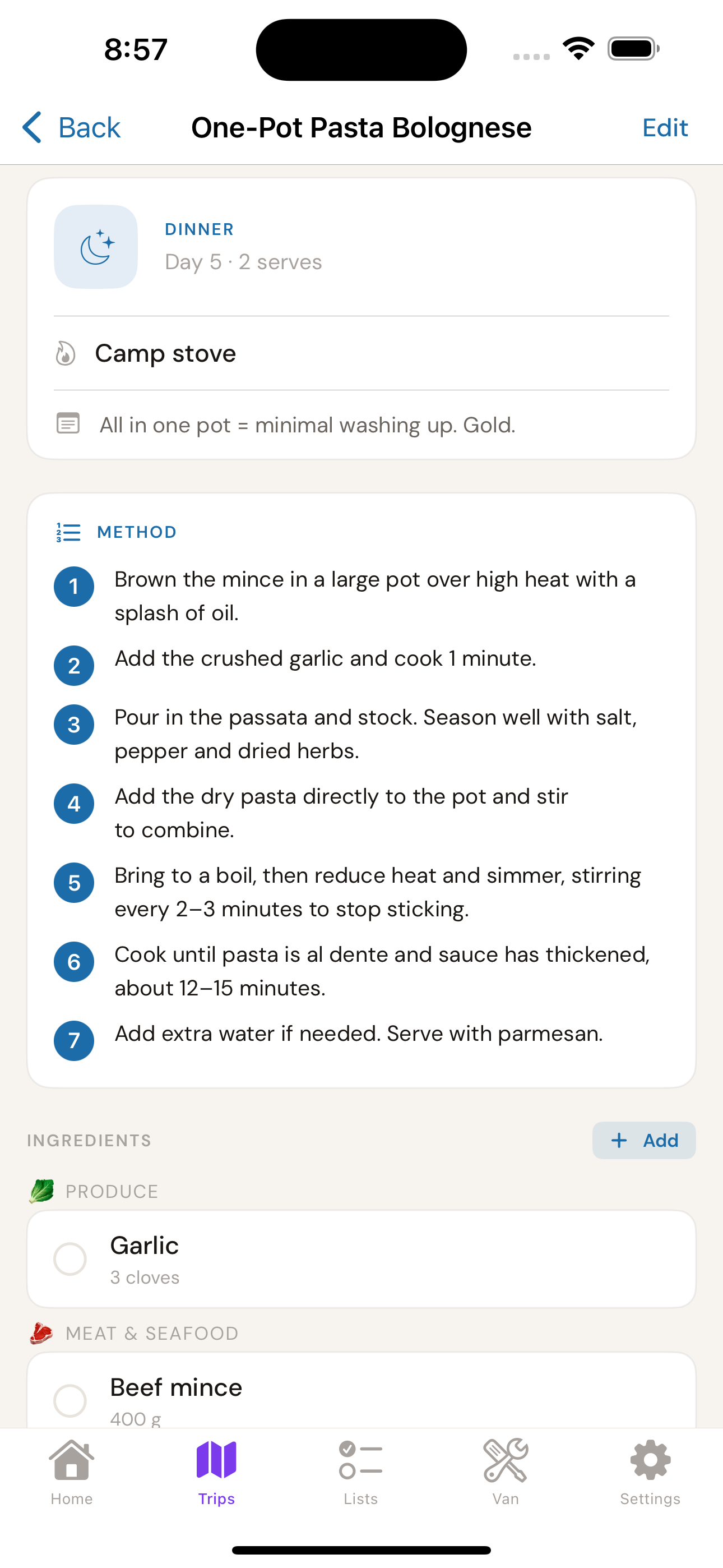
Recipe detail for One-Pot Pasta Bolognese with method and ingredients
5b

Trip Log

Journal, campsites, expenses — your record of every adventure.

1

Open Trip Log from your Trip Detail screen

Trip Log is the "during the trip" module. While you're on the road, tap in each day to capture your journal entry, campsite details, and a photo moment. Think of it as a lightweight travel diary that lives inside your trip record.

2

Write your daily journal

Each day has a journal field — a free-text space to capture how the day went. It doesn't have to be long. "Solid travel day, plenty of stops along the way. Big 4 is quiet, nice spacious grassy site for the next couple of days" is perfect. A sentence or two while it's fresh beats trying to remember it three weeks later.

💡 Tip: Write the journal entry when you're settled at camp for the night — drink in hand, camp chair out. That's the ideal Wide Open Australia moment.
3

Log your campsite details

For each stop, record the campsite name, location, your star rating, cost per night, and whether you'd return. Then tick off available facilities — Power, Water, Showers, Toilets, Dump Point, Dog Friendly, Camp Kitchen, Phone Signal. Over time this becomes a personal campsite guide you actually trust.

4

Capture a Photo Moment

Add a photo to the day's log — the view from the campsite, the campfire, whatever sums up the day. It becomes the visual memory attached to that entry. When you scroll back through old trips, the photo is the thing that brings it all back.

💡 Would return toggle: The "Would return" switch on the campsite card is the most honest rating system there is. Stars lie. The "Would return" toggle doesn't.
Trip log showing journal and campsite details for Big 4 Warnambool
6

Van Maintenance Tracker

Know what needs attention before it needs attention.

1

Access Maintenance from the Van tab or your Trip screen

The Van tab in the bottom navigation gives you a persistent view of your van's health regardless of which trip you're on. You can also access it from any Trip Detail screen under the Maintenance module row.

2

Set up your service items

The default items cover the most common caravan service points: wheel bearings, gas regulator, tyre age, breakaway battery, and water pump. Tap any item to set its last-serviced date and service interval. Wide Open Australia calculates the next due date and tracks the countdown.

3

Read the status indicators

Each service item shows one of three statuses: Good ✓ (well within interval), Due Soon ⚠️ (coming up in the next 30–60 days), or Overdue ! (past service date). The Van Health summary on your trip screen shows counts at a glance.

💡 Before any trip: Check the Maintenance module from your Trip Detail screen. If anything shows Overdue or Due Soon, deal with it before you leave — not in the middle of nowhere.
4

Log services when done

When you get a service done, tap the item, tap "Log Service", and enter today's date. The countdown resets from that date. Over time you build a service history — useful for resale value and warranty claims.

Service schedule with overdue coupling and hitch head
7

Warranty Register

Stop losing warranty cards in the glovebox.

1

Open the Warranty Register from the Van tab

The Warranty Register lives inside the Van section. You'll see a list of your registered appliances and their warranty status — Active, Expiring Soon, or Expired.

2

Add your appliances

Tap the + button to add an appliance. Enter the name (e.g. "Dometic Fridge"), purchase date, and warranty period (usually found on your warranty card or in the manual). Wide Open Australia calculates the expiry date and remaining time automatically.

💡 What to add: Fridge, hot water system, air conditioner, water pump, TV antenna, inverter, solar regulator — anything with a manufacturer's warranty. Do it when you buy, while you still have the paperwork.
3

Watch for expiry warnings

Items showing "Exp in X days" are approaching their expiry. Use this window to check the appliance thoroughly — if something needs a warranty claim, do it before the clock runs out. An "Expired" status means the manufacturer's warranty has passed.

Warranties screen listing all caravan appliances
8

Insurance, Roadside Assist & Emergency Contacts

Everything you need in an emergency — in your pocket, offline.

1

Find it in the Van tab

Insurance, Roadside Assist, and Emergency Contacts are all stored in the Van section. They're not trip-specific — they live at the van level so they're always accessible regardless of which trip is active. In an emergency, you don't want to be hunting through a trip screen to find your insurer's number.

2

Set up your Insurance details

Enter your caravan and vehicle insurer names, policy numbers, and emergency claim phone numbers. Add the policy renewal date so you get a heads-up before it lapses — the last thing you want is to discover you're uninsured at a roadside stop.

💡 What to enter: Policy provider, policy number, 24-hour claims number, and renewal date. For most people that's two entries — one for the van, one for the tow vehicle.
3

Set up Roadside Assist

Add your roadside assistance provider details — NRMA, RAA, RAC, RACQ, RACV, or whoever you're with. Store the membership number and the 24-hour call-out number. If you're heading remote, also note any specific coverage limits (not all standard plans cover outback tracks).

⚠️ Remote travel: Standard roadside assist often doesn't cover unsealed or remote tracks. If you're heading off the bitumen, check whether your plan covers you — and consider specialist cover like CARAVANCAMPINGSALES assist or similar. Note any limitations here.
4

Add your Emergency Contacts

Store the key people who should be contacted if something goes wrong. This is separate from your phone's contacts — it's specifically curated for emergency situations and visible in the app quickly. Add each person's name, relationship, and phone number.

💡 Best practice: Leave a copy of your itinerary with someone at home and add them as your primary emergency contact. Tell them your expected return date and when to raise the alarm if they haven't heard from you. This is basic remote travel safety.
5

This all works offline

All of this information is stored locally on your device. In an emergency in a remote area with no signal, everything here is still fully accessible. That's by design — the time to discover your insurer's number isn't loading is not when you're on the side of the Stuart Highway at midnight.

Van details showing insurance and policy information
9

Landscape Themes

Make your app feel like the trip you're on.

1

Themes are set per-trip

Each trip has its own landscape theme. The theme sets the gradient hero card, progress bar colour, active tab icon, module icon accents, and trip row border. When you switch between trips, the app visually shifts to match.

2

Choosing the right theme

☀️ Outback / Desert — burnt orange to gold. Use for anything inland: Simpson Desert, Broken Hill, Flinders Ranges, Coober Pedy, Nullarbor.

🌊 Coastal / Beach — deep navy to aqua. Use for beach trips: Robe, Great Ocean Road, Ningaloo Reef, Sunshine Coast.

⛰️ High Country — forest green to sage. Use for mountains and rainforests: Snowy Mountains, Alpine NP, Daintree.

🌆 Dusk — purple to amber. The default theme. The Australian sky at 6pm.

3

Changing a theme after creation

Open the trip, tap the edit icon, and change the landscape selection. The entire UI updates instantly. It's purely visual — no data is affected.

💡 Fun tip: If you're doing a mixed trip — say, coastal drive then heading inland — pick the theme for the dominant part of the trip, or the bit you're most excited about.

Pro Tips

Get more out of Wide Open Australia.

Set up your van details once, benefit forever

Spend 10 minutes after downloading setting up your Van profile completely — make, model, year, and all service items with their current intervals. Everything flows from this. The maintenance tracker is only as useful as the data you put in.

Create your trip a week before you leave

Don't create the trip the night before. Create it a week out so you can work through the checklist and maintenance module at a relaxed pace. Rushed pre-departure checks are how things get missed.

💡 The Maintenance module showing anything other than "All good ✓" is a prompt to book a service — a week's lead time means you can actually do something about it.

Add your custom checklist items on your first trip

Every rig has its own quirks. Spend your first trip noting down the things that aren't on the standard checklist and add them as custom items. They'll be there for every future trip.

Use the star rating after every trip

Rate your trips when you get home, while it's fresh. Three months later you'll genuinely appreciate having a record of which campsite was a 5-star and which one you'd skip next time.

Register warranties the day you buy

Don't wait until something goes wrong to wish you'd logged it. When a new appliance arrives, open Wide Open Australia and add it to the warranty register immediately. It takes 30 seconds.

FAQ

Common questions

Does it work without internet?
Yes, completely. All data is stored on your device. You can use every feature of Wide Open Australia in areas with zero mobile coverage — which, if you're going anywhere interesting in Australia, is basically everywhere.
Is it a subscription?
No. One-time purchase, all features included, free updates. We don't believe in charging you a monthly fee to track your own van maintenance.
Can I use it for multiple vans?
The current version is optimised for a single van profile. Multi-van support is on the roadmap for a future update — particularly relevant for dealers and families with more than one rig.
What if I have a camper trailer, not a caravan?
Wide Open Australia works equally well for camper trailers. The maintenance items and checklists are broadly applicable to any towed setup. You can customise the service items and checklist to match your specific rig.
What does Camp Kitchen include?
Camp Kitchen covers meal planning, recipes, and camp cooking organisation for your trip. Plan your meals by day, manage quantities for your crew size, and keep your favourite camp recipes in one place.
Will my data transfer if I get a new iPhone?
Your data is backed up via iCloud if you have iCloud backup enabled on your device. When you set up your new iPhone and restore from backup, Wide Open Australia restores with it.
I found a bug or have a feature request — where do I send it?
We genuinely want to hear from you. Email us at support@wideopenaustralia.app or leave a review on the App Store. Feature requests from real users drive the roadmap.